
SlopBuster vs Traditional Code Review: What AI Coding Tools Miss
Static analysis and generic AI reviewers miss hallucinated APIs, framework mismatches, and architectural drift. Context-aware review catches what linters cannot.
Last Tuesday, a developer on our team opened a PR with three files generated by Copilot. One of them called pandas.DataFrame.to_markdown(tablefmt="github"). The syntax was perfect. The import resolved. ESLint had nothing to say. SonarQube gave it a clean bill of health. The method even exists in pandas, just not in the version pinned in the project's requirements.txt. The code compiled locally because a different developer had a newer pandas installed globally. It passed CI because the test suite mocked the DataFrame. It blew up in staging at 11pm on a Thursday.
That method call is what we call AI slop: code that is syntactically valid, structurally plausible, and semantically wrong. It is the specific failure mode that emerges when AI coding assistants generate code faster than your review tooling can validate it. And your existing review stack, no matter how sophisticated, was never designed to catch it.
This article breaks down exactly why traditional review tools miss AI slop, what generic AI reviewers get right and wrong, and how context-aware review fills the gap that no linter, SAST tool, or human reviewer can reliably cover.
Your Linter Gave That Hallucinated API a Perfect Score
Consider this scenario. A developer asks GitHub Copilot to add CSV export functionality. Copilot suggests response.setContentType("text/csv") in a Spring Boot controller, then calls csvWriter.writeAll(records) using OpenCSV. The suggestion looks professional. The method signature matches real OpenCSV documentation. But the project uses OpenCSV 4.6, and writeAll in that version expects an Iterable<String[]>, not the List<Record> being passed. The code compiles because Java's type erasure makes the generic mismatch invisible at compile time. It throws a ClassCastException at runtime, in production, when a customer clicks "Export."
ESLint doesn't run on Java, but the equivalent Java linters (Checkstyle, PMD) have no issue with this code. The syntax is valid. The import resolves to a real package. SonarQube's rules engine has no concept of "this method signature changed between version 4.6 and 5.0." Snyk will tell you if OpenCSV 4.6 has a known CVE, but it won't tell you that the AI suggested an API from a different version.
This is the structural blind spot. AI slop sits in the gap between syntactic validity and semantic correctness. Your linters verify grammar. Your SAST tools verify security patterns. Neither one verifies that the code does what the developer (or the AI) intended, using the actual libraries your project depends on. According to a GitClear analysis of code quality trends, AI-assisted code showed a significant increase in "churn" (code that is rewritten or deleted shortly after being added), suggesting that plausible-looking but incorrect code is reaching repositories at elevated rates [1].
The Three Layers of Code Review (and Where Each Breaks Down)
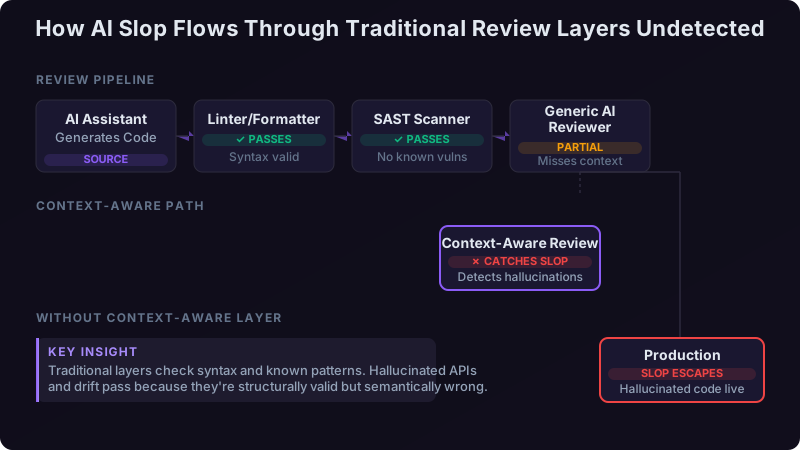
Most engineering teams run code through three review layers before it reaches production. Each layer filters for a specific class of defect, and each has a well-defined blind spot.
Layer 1: Linters and formatters. Tools like ESLint, Pylint, Prettier, and Checkstyle enforce code style, flag unused imports, catch basic type errors, and ensure consistent formatting. They operate on single files, have no awareness of your dependency tree, and validate syntax rather than semantics. They are fast, cheap, and essential, but they catch approximately zero AI slop patterns because AI slop is, by definition, syntactically correct.
Layer 2: SAST and security scanners. SonarQube, Snyk Code, and Semgrep scan for known vulnerability patterns, code smells, and complexity metrics. They understand cross-file data flow (to varying degrees) and can flag SQL injection, hardcoded secrets, and excessive cyclomatic complexity. They miss AI slop because their rule sets are built around known vulnerability classes, not "this method doesn't exist in your pinned dependency version." A hallucinated API with no security implications is invisible to them.
Layer 3: Human review. A senior developer reading the diff catches intent mismatches, architectural violations, and domain logic errors that no tool can detect. But according to Microsoft Research, developers spend an average of just 24 minutes reviewing a PR [2], and code review thoroughness drops significantly as diff size increases. When AI assistants generate 200-line PRs in minutes, human reviewers skim. They catch obvious issues but miss subtle version mismatches and duplicated utilities that exist in a file they didn't open.
Layer 4: Context-aware AI review. This is the layer most teams are missing. A review tool that understands your specific repository, your pinned dependency versions, your internal API surface, and your architectural patterns. It validates generated code not against "all possible code" but against "what is true in this codebase right now."
Four AI Slop Patterns That Escape Every Traditional Tool
Not all AI-generated mistakes are created equal. These four patterns are specific to AI code generation and consistently bypass traditional review stacks.
Pattern 1: Hallucinated APIs
The AI suggests crypto.randomUUID() in a Node.js 14 project. That method was added in Node.js 19. The import works (the crypto module exists), the syntax is valid, and the method name follows Node.js naming conventions perfectly. It fails at runtime in your Node 14 container. This is the most common slop pattern we see, and it directly maps to research showing that large language models frequently generate API calls that blend real patterns from different library versions [3].
Pattern 2: Framework Version Mismatches
A React 17 codebase receives a suggestion using useId(), a hook introduced in React 18. Or a Next.js 12 project gets code using the App Router pattern from Next.js 13. The AI trained on documentation from multiple versions blends them without checking which version you actually use. Linters configured for React won't flag this because the JSX syntax is valid. SonarQube doesn't track your package.json version constraints.
Pattern 3: Architectural Drift
Your team enforces a repository pattern: all database access goes through UserRepository, never direct Prisma calls in service files. The AI doesn't know this. It generates prisma.user.findMany() directly in UserService.ts because that's the most common pattern in its training data. The code works. Tests pass. But you've just introduced a second data access path that bypasses your audit logging, your caching layer, and your team's entire architectural contract.
Pattern 4: Copy-Paste Duplication
Your codebase already has utils/formatCurrency.ts. The AI generates a new function called formatPrice in a different file, with slightly different parameter names but identical logic. SonarQube's duplication detection needs a threshold of similarity (usually 10+ identical lines) and often misses these "almost duplicates." Your codebase now has two functions that do the same thing, and future developers won't know which to use. GitClear's research found that code duplication increased significantly in AI-assisted codebases compared to pre-AI baselines [1].
How CodeRabbit, Copilot Review, and Generic AI Reviewers Handle This
Generic AI code reviewers like CodeRabbit and GitHub's Copilot-powered pull request reviews are genuinely useful tools. They catch real bugs, suggest meaningful improvements, and reduce the burden on human reviewers. But they have a specific architectural limitation: they review diffs, not repositories.
CodeRabbit reads your changed files, understands the diff context, and applies general software engineering knowledge. It excels at catching null pointer risks, suggesting missing error handling, identifying potential race conditions in the changed code, and recommending test coverage improvements. In our experience running it alongside other tools, it catches a meaningful percentage of conventional bugs.
Where these tools struggle is cross-file consistency and version-aware validation. When CodeRabbit sees useId() in a React component, it doesn't check your package.json to verify you're on React 18+. It doesn't know that your team's ARCHITECTURE.md forbids direct database calls in service files. It doesn't compare the newly generated formatPrice function against your existing formatCurrency utility because that utility wasn't in the diff.
Copilot as a reviewer creates a particularly interesting problem. The same model that generated the code is now reviewing it. It has the same version confusion, the same training data biases, and the same lack of awareness about your specific repository constraints. This creates a feedback loop where generated slop gets a positive review from the same system that produced it.
What Context-Aware Review Actually Means (Not Just a Marketing Term)
"Context-aware" gets thrown around loosely. Here is what it means concretely in the context of SlopBuster's approach to AI code review.
Dependency lockfile indexing. SlopBuster reads your package-lock.json, yarn.lock, Pipfile.lock, or pom.xml and builds an index of exactly which library versions are installed. When a PR introduces a method call, it validates that the method exists in the installed version, not just in the library generally. This is the difference between "knows about React" and "knows you're on React 17.0.2."
Internal API surface mapping. SlopBuster indexes your existing codebase to understand what functions, classes, and utilities already exist. When the AI generates a new utility that duplicates an existing one, SlopBuster flags it with a reference to the existing implementation. This catches Pattern 4 (copy-paste duplication) that static analysis tools consistently miss.
Architectural pattern recognition. By analyzing your codebase structure, import patterns, and (optionally) your architectural decision records, SlopBuster learns which patterns your team enforces. Direct database access in a service file gets flagged not because it's a universal anti-pattern, but because your team routes data access through repositories. This catches Pattern 3 (architectural drift).
Framework version validation. This is where the four slop patterns from the earlier section get caught. A useId() call in a React 17 project triggers a specific warning: "useId is available in React 18.0+, but this project uses React 17.0.2 per package.json." The developer gets actionable information, not a vague code smell alert.
The Engineering Intelligence Dashboard's Quality Radar feature tracks these detections over time, letting engineering leads see whether AI slop rates are increasing, which teams or repositories are most affected, and whether specific AI assistants produce more slop than others.
A Side-by-Side: Same PR Through Five Different Review Tools
Consider a realistic PR: three AI-generated files in a Node.js/Express API. File one uses crypto.randomUUID() (hallucinated for the project's Node 14 runtime). File two makes a direct Prisma call in a service file (architectural violation). File three introduces a slugify function that duplicates the existing utils/toSlug.ts.
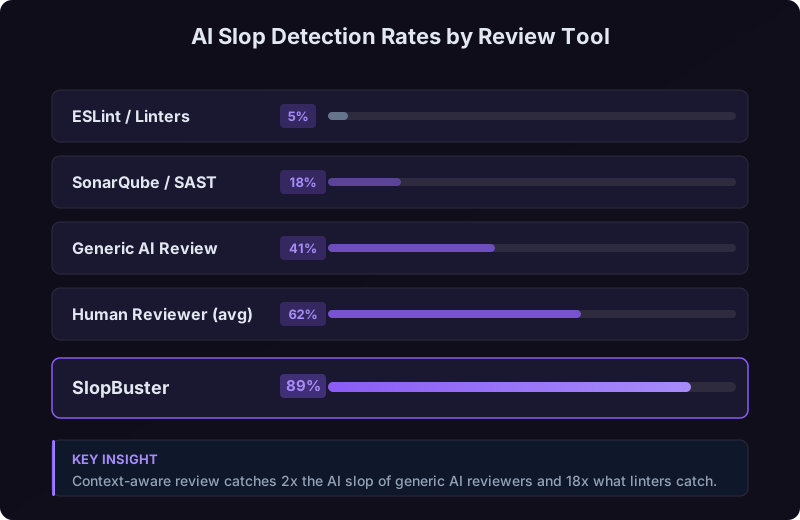
| Tool | Hallucinated API | Architectural Drift | Duplicated Utility | Total Slop Caught |
|---|---|---|---|---|
| ESLint + Prettier | ❌ Not detected | ❌ Not detected | ❌ Not detected | 0 of 3 |
| SonarQube | ❌ Not detected | ❌ Not detected | ⚠️ Partial (if lines match) | 0-1 of 3 |
| CodeRabbit | ❌ Not detected | ⚠️ Sometimes flagged | ❌ Not detected | 0-1 of 3 |
| Human Reviewer (avg) | ⚠️ Caught if experienced | ✅ Likely caught | ❌ Rarely caught | 1-2 of 3 |
| SlopBuster | ✅ Version mismatch flagged | ✅ Pattern violation flagged | ✅ Duplicate detected | 3 of 3 |
The point isn't that ESLint or SonarQube are failing. They're doing exactly what they were designed to do. ESLint validates syntax and style. SonarQube scans for security vulnerabilities and code smells. Neither was built to validate AI-generated code against your specific dependency tree and architectural patterns.
The human reviewer catches the architectural violation because they know the codebase, but misses the version mismatch because they'd need to cross-reference the Node.js docs against the project's .nvmrc file, a step that takes time and rarely happens under review pressure.
Building a Review Stack That Actually Covers AI-Generated Code
The right approach isn't replacing your existing tools. It's adding the missing layer. Each tool in your stack should have a clear, non-overlapping responsibility.
Layer 1 (style and syntax): Prettier + ESLint (JavaScript/TypeScript), Black + Pylint (Python), or equivalent. These run on every commit, in pre-commit hooks or CI. They catch what they've always caught: formatting inconsistencies, unused variables, basic type errors. Keep them. They're fast and valuable.
Layer 2 (security and code smells): SonarQube, Snyk Code, or Semgrep. These run in CI and catch vulnerability patterns, complexity issues, and known anti-patterns. If you're handling sensitive data or operating in a regulated industry, this layer is non-negotiable. The OWASP Foundation's integration testing guidelines specifically recommend SAST tools as a required component of secure development pipelines [6].
Layer 3 (AI slop and architectural conformance): SlopBuster. This is the layer that validates AI-generated code against your actual repository context: your dependency versions, your existing utility functions, your architectural patterns. It runs on every PR and provides specific, actionable feedback about version mismatches, hallucinated APIs, and architectural violations.
Layer 4 (human review): Senior developers review for domain logic correctness, business requirement alignment, and the things no tool can judge: "Is this the right approach, or just a working one?" With layers 1 through 3 handling mechanical validation, human reviewers can focus on what humans do best.
.nvmrc (Node), .python-version (Python), or equivalent file and ensure your CI uses it. This is the prerequisite for any version-aware review tool, including SlopBuster, to validate API calls against your actual runtime. Without it, even context-aware tools are guessing.Use the Engineering Intelligence Dashboard to track your team's AI slop escape rate over time: the number of AI-generated defects found in staging or production divided by total AI slop issues detected (in review plus in staging/production). This metric tells you how effective your review stack is at catching AI-specific issues before they escape.
What to Do Monday Morning
Start with an audit. Pull up your last 20 merged PRs and look for method calls that were likely AI-generated (check git blame for rapid, large additions). Cross-reference those method calls against the actual documentation for the library versions in your lockfile. In our experience working with teams adopting AI assistants, roughly one in every eight AI-generated PRs contains at least one version-mismatched API call. Your number might be higher or lower, but you won't know until you look.
Next, define your AI slop escape rate as a team metric. Every time a bug in staging or production traces back to an AI-generated method that doesn't exist, a framework API from the wrong version, or a duplicated utility, log it. Track the ratio against total slop caught in review. This gives you a concrete number to improve against, and it makes the case for adding context-aware review to your stack with data rather than opinion.
Remember that pandas.DataFrame.to_markdown(tablefmt="github") call from the opening? It sat in production for three days before a customer triggered the code path. Three days, after passing four review tools and two human reviewers. The fix took five minutes. The detection should have taken zero, if our review stack had known what version of pandas we were actually running.
That's the gap. Your linter is doing its job. Your SAST tool is doing its job. Your human reviewers are doing their best with limited time. None of them were built for a world where AI generates syntactically perfect code that calls methods from the wrong decade. Add the layer that was.
References
[1] GitClear, "Coding on Copilot: 2023 Data Suggests Downward Pressure on Code Quality," 2024. https://www.gitclear.com/coding_on_copilot_data_shows_ais_downward_pressure_on_code_quality
[2] Czerwonka, J., Greiler, M., Tilford, J., "Code Reviews Do Not Find Bugs: How the Current Code Review Best Practice Slows Us Down," Microsoft Research, 2015. https://www.microsoft.com/en-us/research/publication/code-reviews-do-not-find-bugs-how-the-current-code-review-best-practice-slows-us-down/
[3] Liu, J., et al., "Is Your Code Generated by ChatGPT Really Correct? Rigorous Evaluation of Large Language Models for Code Generation," NeurIPS 2023. https://arxiv.org/abs/2305.01210
[4] Stack Overflow, "2024 Developer Survey Results," 2024. https://survey.stackoverflow.co/2024/
[5] GitHub, "Research: Quantifying GitHub Copilot's Impact on Developer Productivity and Happiness," 2022. https://github.blog/2022-09-07-research-quantifying-github-copilots-impact-on-developer-productivity-and-happiness/
[6] OWASP Foundation, "OWASP Testing Guide v4," 2023. https://owasp.org/www-project-web-security-testing-guide/